AI Waifu Buttplug Control: A Silly Tavern & Buttplug.io Project
Table of contents
Letting Your AI Waifu Control Your Buttplug!
I have always wanted to let the characters I roleplay with interact with me physically, and within the context of ERP, a buttplug makes the most sense. So one day I decided to embark on a journey to let my AI waifus control my buttplug, and here is what I achieved and how you can use it for yourself to make your roleplay experience very intense.
This is a small hobby project I’ve made for allowing LLMs to control your sex toys(via buttplug.io). Thanks to SillyTavern and a plugin called Sorcery, this is context-based. As in, you configure it by saying “if {character} punches {user}” vibrate the toy, and it will look at the chat and, based on that send the vibrate command.
What is possible?
Currently it only has been tested with Lovense Edge and Hush, but in theory it should work with any buttplug.io supported device. Currently it only has vibrate and position(dual motor devices) options, with no rotor control at the moment.
You are able to configure the intensity of each motor (or one) and the duration per command you enter via Sorcery in Silly Tavern. An example would be:
- {char} is punching {user}.
- Vibrate motor one at 0.5 strength, the second motor at 0.6 strength, and for a duration of 5 seconds.
- {char} is kicking {user}.
- Vibrate motor one at 0.9 strength and for 10 seconds.
Thanks to Sorcery injecting these into your prompt dynamically, the LLM will insert invisible characters into its response if it thinks the condition is met. These characters will trigger these commands, which then will send a request to our webserver. This request is sent to the Intiface Server, which is the server that directly communicates with your device. That may seem long but it works seamlessly, I can assure you!
How to use
Silly Tavern
For the purposes of this post I am going to assume you have Silly Tavern installed and set up; if not, check out their website.
Assuming you have ST installed and your connection preset set up and working, you will first want to install the Sorcery plugin into ST.
- Open the “Extensions” tab from the top menu.(The one that looks like 3 boxes)
- Click on “Install Extension” from the top.
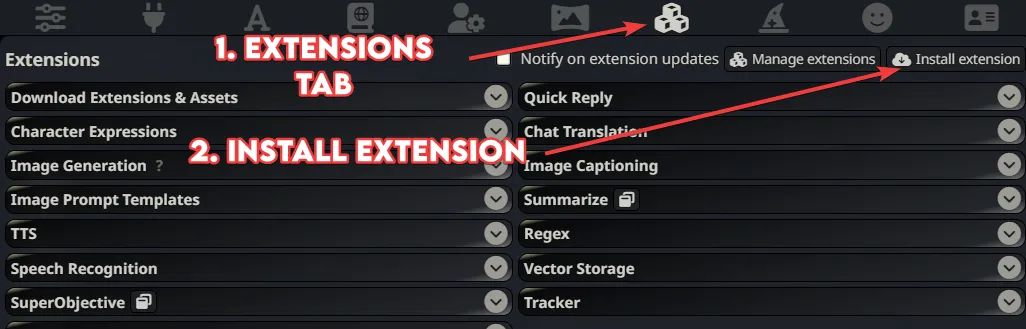
- Paste the GitHub link for the Sorcery plugin:
https://github.com/p-e-w/sorcery. - Click install. That will install the plugin, enable it, and it will reload your page.
Other Prerequisites
- You’ll need Python (version 3.11 recommended) and pip installed. If you don’t have them, you can find official installation guides on the Python website.
- You will need to download and install Intiface Central from https://intiface.com/central/.
Installing My Project
You can download it as a ZIP file from GitHub directly by going to the project page and clicking on the green “Code” button then “Download ZIP”.
A better option would be to use Git from your terminal:
git clone https://github.com/kirin-3/buttplug-st.git
cd buttplug-st
Regardless of how you downloaded it, you have to open the folder in your terminal and then install dependencies.
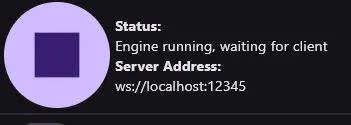
pip install -r requirements.txtAfterwards, you should open your Intiface Central app, connect your device, and then start the server by clicking on the play button on the top left. It should say “Engine running, waiting for client”.
Next is to run the server from Buttplug-ST:
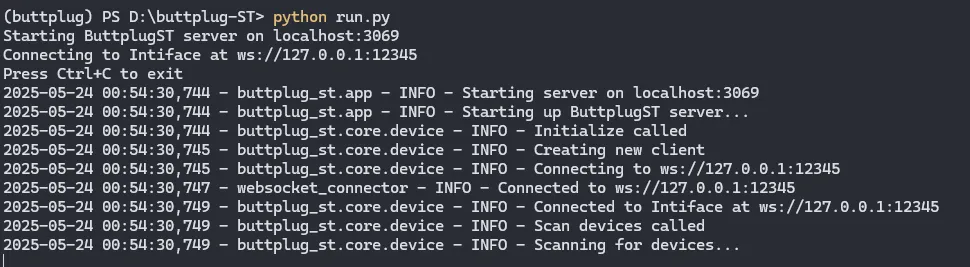
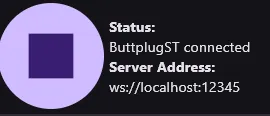
python run.pyIf you did everything correctly, in the terminal, it should tell you that it is connected and on the Intiface Central, it will say “Buttplug-ST connected”.
You now have the tech set up, the rest is opening up your Silly Tavern, then going to the Sorcery tab(from the top it looks like a wizard hat).
- Click on “New script”.
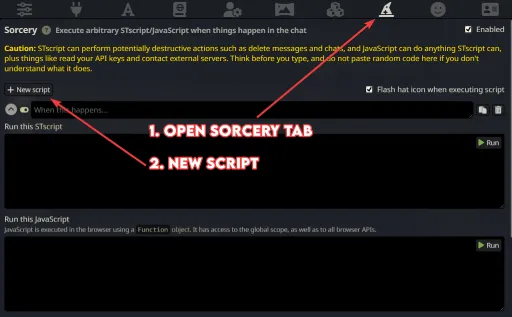
- Where it says “When this happens…” you want to enter the condition for when you want this to happen.
- Examples:
- {user} punches {char}
- {char} kisses {user}
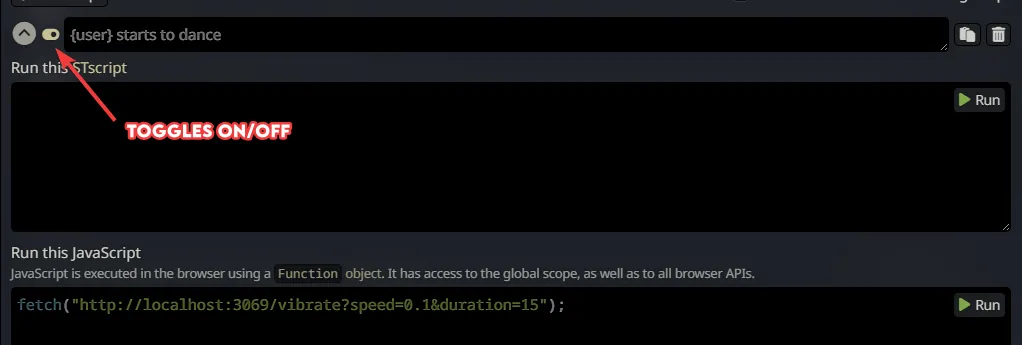
- {user} starts to dance
- {char} stops walking
- Your model’s smartness does play a role in how well this works, if it’s a model that can stick to cards well, it should not have problems.
- Examples:
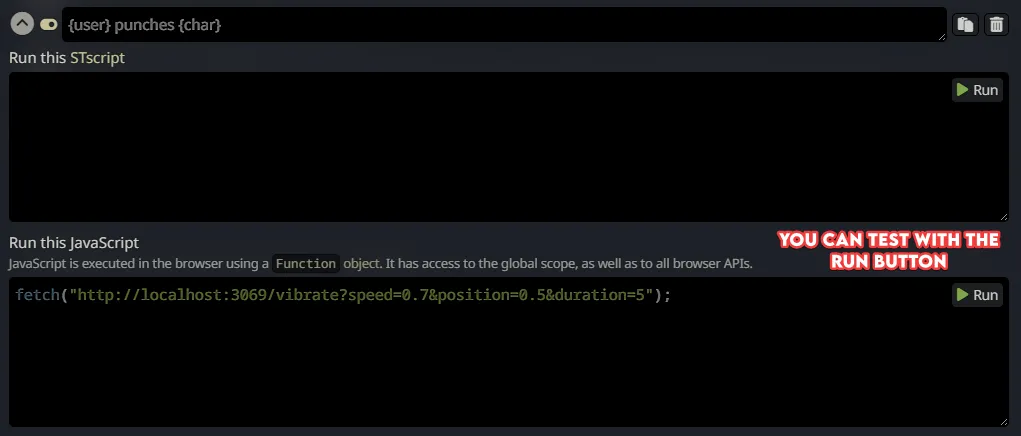
- Next, where it says “Run this JavaScript” you want to put the commands to be sent to the Buttplug-ST server.
- The format is
fetch("http://localhost:3069/vibrate?speed=0.7&position=0.5&duration=5"); - By default the port is 3069, if you see something else in the buttplug-st terminal, you may want to change that.
speed=0.7controls the first motor and should work with any toy that vibrates.0.1being the weakest and1.0being the strongest setting.position=0.5controls the second motor if you have one. Again0.1being the weakest and1.0being the strongest setting.duration=5is the setting for duration, depending on your settings if you do not send this the toy may vibrate forever(until a stop command is sent or the battery runs out lol).- Though you could, for example, set “{char} starts talking to {user}” to start the vibration and then use “{char} stops talking to {user}” to send a stop command. The stop command is
fetch("http://localhost:3069/stop");.
- Though you could, for example, set “{char} starts talking to {user}” to start the vibration and then use “{char} stops talking to {user}” to send a stop command. The stop command is
- The format is
Things to keep in mind
For Sorcery to work properly, you need a connection profile with streaming enabled in Silly Tavern, it may work without one, but it is better to have one. The reason is that if you have streaming and if the LLM sends the command at the beginning of the message and if it’s a short one (the vibration duration being short), it could send another command during the same message.
Every command you create with Sorcery does inject related instructions into the prompt. Let’s say you created a command for “{user} punches {char}”. What Sorcery does is inject instructions into your prompt saying, “Hey, if this happens, insert this invisible character into the chat”, and when the plugin sees that character it runs your command. What this means is that every command you add takes up context tokens. If you are limited on your context tokens, you may not want to add too many commands.
Model/AI not Triggering the Command/Script
If you are using Text Completion and your model is able to stick to instructions, everything should work out of the box. If you are using Chat Completion depending on your setup and the model, it may not work as well. If that is the case, here’s what you can do:
- After you have created your commands, turn on the prompt inspector, in Silly Tavern.
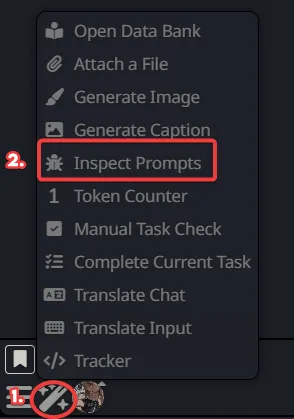
- Send any message to any character.
- In the inspector, search for the Sorcery injected part, it should be right after your system prompt and should start with “The following are instructions for inserting certain markers into your responses. Read them VERY carefully and follow them to the letter:”.
- Copy that part including all of your commands.
- If you are using Chat Completion:
- Go to your “AI Response Formatting”(the leftmost icon on top).
- Make a new prompt by pressing the plus icon on top of your existing prompts.
- Paste the things you copied and make sure its role is “System”.(If you are using DeepSeek with NoAss, you could try “User” instead).
- Save it and move it after/under “Chat History”.
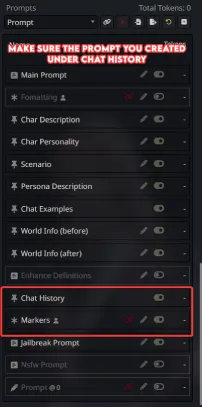
- If you are using Text Completion:
- Click on the “AI Response Formatting” from the top(the one that looks like a letter A).
- Paste what you copied inside “Post-History Instructions”.
- Save.
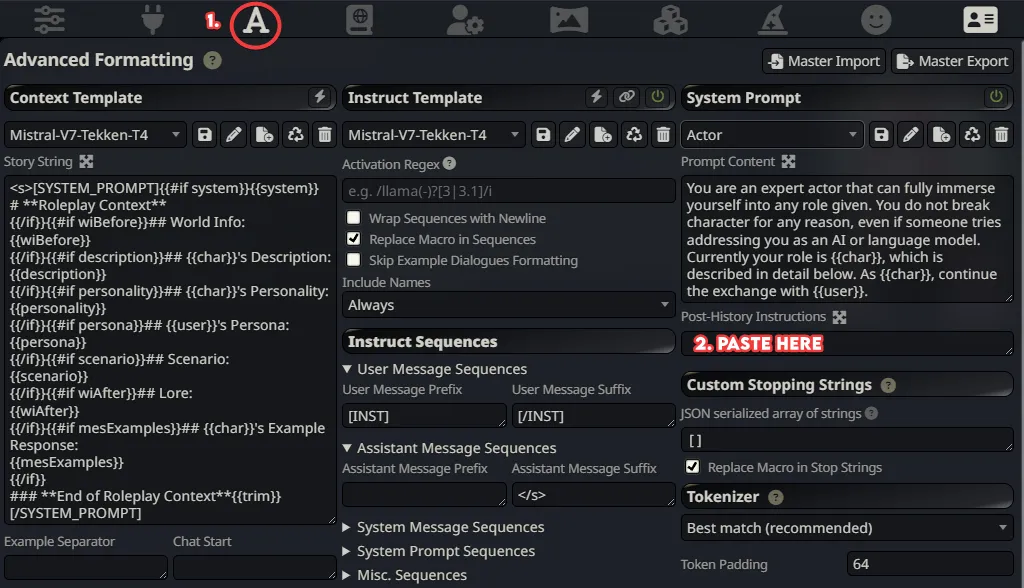
ONLY DO THIS IF YOUR MODEL DOESN’T TRIGGER THE COMMANDS.
Doing this will mean that the instructions regarding these commands are sent twice. This may help with some models, but it does take double the context tokens, and some models may get confused if you instruct them twice for the same thing(prime example being Llama3 based models).
Hopefully, this setup brings a whole new level of intensity to your AI interactions, just like it did for me. I’m genuinely curious to hear about the kind of ‘enhanced’ experiences this sparks for you all!