My Small Project for Modal and SDXL
Table of contents
My Small Project for Modal and SDXL
This is a small hobby project using Modal backend and a small local Flask web server as the front end. The code is mostly vibe-coded.
Why bother with this?
Well, firstly, it is more of a learning experience than an actual product. This is also very cheap since you are paying for the GPU usage on Modal. If you need more GPU power, or if you are on AMD like me, this is a solid option for generating images on the cheap.
What can it do?
Currently, it only works with SDXL based models. By default, it uses an L4 GPU, but this can be configured (via the .env file). You are able to do the basics: prompt, negative prompt, image dimensions, batches, CFG scale, clip skip, scheduler options, and LoRAs. It’s also designed to handle very long prompts thanks to a custom chunking mechanism and intelligently manages model loading in the backend to save memory.
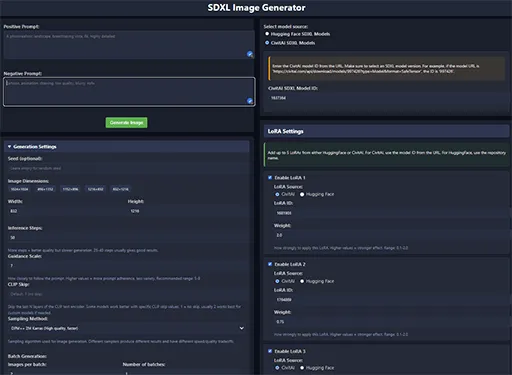
You are able to download and use models, checkpoints, and LoRAs from Hugging Face or Civitai; the backend downloads and caches them after they are downloaded, and the persistent storage volume is free on Modal.
At the moment, it only has two options for the schedulers, as I personally do not use others, but the backend has them listed, and it is easy to extend it if you wish to. The same applies to the LoRA count; currently, it is only up to 5 LoRAs, but it can easily be made to handle more.
One challenge with SDXL is its token limit for prompts. To overcome this, I implemented prompt chunking, inspired by how tools like A1111 handle it. This means you can write much more detailed prompts, and the backend cleverly splits and processes them to get the full context into the model.
Running multiple models or many LoRAs can be memory-intensive. To keep things running smoothly on Modal and manage costs, the backend includes logic to cache loaded models and even unloads the least recently used ones if memory gets tight.
Downloading models and LoRAs every time would be slow and could add to costs. The Modal backend intelligently caches these on its persistent volume, so once downloaded, they’re ready to go much faster for subsequent generations.
Cost
If you are not able to run a Stable Diffusion web UI (Forge/A1111/SD.Next) locally, or if you want bigger images and your VRAM isn’t enough, or if you want a lot of images faster, you would have to run it on the cloud. The best and simplest way to do this is often to use services like RunPod or Vast.AI. They have templates, and you pay per hour. These are pretty good, in my opinion. However, if you want something cheaper, there are limited options beyond running locally (which itself may not even be cheaper).
Firstly, there is Google Colab. There is a free tier for it as well, but it gets interrupted a lot. The paid version allows you to use L4 or A100 GPUs with more power, and it is cheaper than services like RunPod, but the startup takes a lot of time. Colab wasn’t designed for running things like Stable Diffusion web UIs, and its I/O can be a bottleneck. There is also no persistent storage. You can mount your Google Drive, but copying files to and from it still takes considerable time (usually better off downloading). If you are interested, there is a version here that works well; it is Forge.
So why would Modal be cheaper? Well, it is not just cheaper; it can be free. Yes, free as in beer. When you sign up for Modal, you get $5 credit. If you verify with a card, which involves them charging you $0.50 and refunding it, you get $30 credit per month.
The price for usage depends on a lot of things. The main factor is the GPU, you can find Modal’s pricing here. By default, the project uses an L4 GPU and can do 4 parallel generations requests(will depend on dimensions). If you wanted to, you could use a T4 for a cheaper cost. That said, consider this: each time you send a prompt, the container boots up and tries to download everything, then load into VRAM. That takes time and costs money. Instead of sending prompt after prompt, you would want to use batches to make it cheaper. With an L4, a batch producing 16 images (4x4) costs about $0.70. That would allow me about 670 images to use the full $30 credit. That is not very optimized, but as I said, you can do batches bigger than 4 as well, and if you lower the resolution, you could generate more in parallel, or if you are certain of your prompt, you could change the GPU to a better one and then run a very large batch.
Usage
Detailed explanations regarding usage can be found on the GitHub page README.
About Civit AI IDs
When you are using the Civit AI IDs do not copy them from the URL/address bar, that will not work. Instead you will want to copy the ID from the download link. Right click the download button on the Civit AI model page then “Copy Link Address”, and from that you want to get the ID for your model or LoRA.